This post was written from inside a Kubernetes pod. A pod on a server in my garage, running on a cluster I also run from inside that same pod. The laptop in front of me is a terminal and nothing else.
That setup is the subject of this first post. Later posts will cover the cluster it runs on, the tiny VPS cluster that serves this site, and the two Home Assistant clusters that round out the lab. This one is just about how I get work done.
Why
I wanted three things from a development environment:
- Sessions that survive the laptop. Lid closes, wifi drops, I move from the desk to the car, and the shell is exactly where I left it.
- One place where state lives. Repos, build caches, kubeconfigs, scratch files. Not scattered across whatever machine I happened to use last.
- A toolchain I can rebuild from a file. When I need a new tool, I edit a Dockerfile, push, and a few minutes later a fresh box arrives with it installed.
A pod on the home cluster gives me all three. It also sits on the same network as everything else I run, with fast local disk, and it gets rebuilt and redeployed by the same GitOps pipeline as the rest of the lab.
Where this lives
The pod runs on my main home cluster, a kubeadm cluster with Cilium for
networking, ArgoCD for deployments, and Forgejo for git hosting and CI. The
cluster is described in a repository called infraconfig, the platform,
which holds all the infrastructure I run. A second repository,
infra-internal, holds things I run on that platform. The dev pod is
currently the only thing in it.
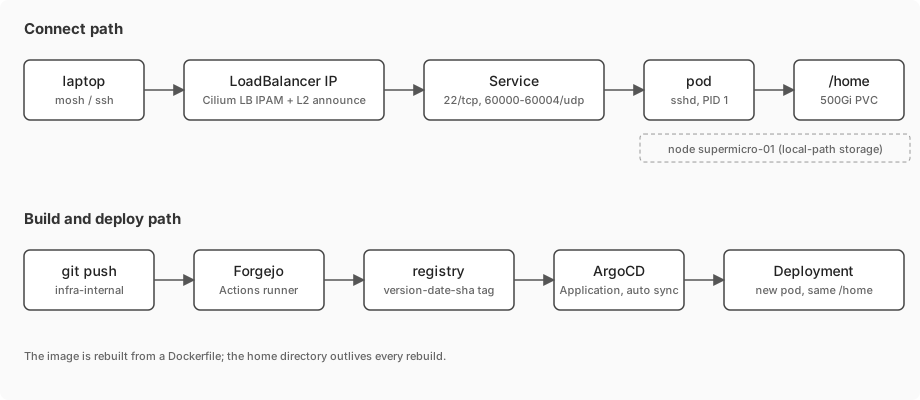
That split matters for the rest of this post. The platform repo decides how a pod gets an IP address on my network and how an image gets built. The internal repo decides what the pod contains and where its home directory goes.
The image
The pod is an AlmaLinux 10 image built from a Dockerfile in infra-internal.
It starts from the minimal image, installs sshd, and runs it as PID 1. That
is the whole process model: the container is an SSH server, and everything
else is something I start from a shell.
Trimmed, it looks like this:
FROM docker.io/almalinux:10.1-minimal-20260129

RUN microdnf install -y dnf
RUN dnf -y install openssh-server sudo && \
    ssh-keygen -A

RUN dnf -y install epel-release

RUN dnf -y install \
    bash-completion bind-utils containers-common crun \
    fuse-overlayfs git jq make mosh openssh-clients \
    skopeo slirp4netns tig tmux vim wget ...

# PostgreSQL 18 client from PGDG, Go from go.dev
RUN dnf -y install postgresql18
RUN wget -q https://go.dev/dl/go1.26.1.linux-amd64.tar.gz -O /tmp/go.tar.gz && \
    tar -C /usr/local -xf /tmp/go.tar.gz
ENV PATH="/usr/local/go/bin:${PATH}"

RUN useradd -m -G wheel edsouza && \
    echo 'edsouza ALL=(ALL) NOPASSWD: ALL' > /etc/sudoers.d/edsouza

EXPOSE 22
CMD ["/usr/sbin/sshd", "-D", "-e"]
A few choices worth explaining:
- Go and the Postgres client are the two toolchains I use most. Anything heavier lives in its own container.
- The user is created in the image, but its home directory is not. The home directory is a volume, which is the point of the next section.
Authentication should be SSH keys only. Bake your public key into
~/.ssh/authorized_keys for the user, set PasswordAuthentication no in
sshd_config, and never put a password in a Dockerfile.
The image is built by Forgejo Actions whenever a push to main touches the
Dockerfile or the VERSION file. The tag is VERSION-DATE-SHA, so a tag
like 1.0.0-20260314-b5d7f98 tells me exactly which commit built it. The
runner pushes to the cluster’s private registry, and the Deployment pins that
tag explicitly. Nothing uses latest.
Running it
The Deployment is short. The parts that matter:
spec:
  replicas: 1
  template:
    spec:
      nodeSelector:
        kubernetes.io/hostname: supermicro-01
      containers:
      - name: almalinux-edsouza
        image: container-registry.***********/edlab/edlab-infra/almalinux-edsouza:1.0.0-20260314-b5d7f98
        volumeMounts:
        - name: home
          mountPath: /home/
        securityContext:
          allowPrivilegeEscalation: true
          capabilities:
            add: [NET_BIND_SERVICE, SYS_CHROOT, AUDIT_WRITE, SETGID, SETUID, SETFCAP]
      volumes:
      - name: home
        persistentVolumeClaim:
          claimName: almalinux-edsouza-home-pvc
The home directory is a PersistentVolumeClaim using the
local-path storage class. That means it is a directory on one specific
node’s disk, which is why the pod is pinned to the supermicro-01 node with a
nodeSelector. I accepted that trade deliberately: local disk is fast, and I
only ever need one of these pods.
I rebuild the image whenever I want. Everything I care about is under /home,
and /home survives every rollout.
The capabilities list is what sshd needs to do its job in an
unprivileged container: bind port 22, chroot for privilege separation,
switch uid and gid to my user, and write audit records. Without SETUID and
SETGID you can connect but never log in, and the error message does not
tell you that.
The Service is where mosh shows up:
apiVersion: v1
kind: Service
metadata:
  name: almalinux-edsouza
  namespace: devel
spec:
  type: LoadBalancer
  selector:
    name: almalinux-edsouza
  ports:
  - { name: ssh,   protocol: TCP, port: 22,    targetPort: 22 }
  - { name: mosh0, protocol: UDP, port: 60000, targetPort: 60000 }
  - { name: mosh1, protocol: UDP, port: 60001, targetPort: 60001 }
  - { name: mosh2, protocol: UDP, port: 60002, targetPort: 60002 }
  - { name: mosh3, protocol: UDP, port: 60003, targetPort: 60003 }
  - { name: mosh4, protocol: UDP, port: 60004, targetPort: 60004 }
A Kubernetes Service cannot express a port range, so each mosh port is listed by hand. Five is enough for five concurrent mosh sessions, which is more than I have ever needed.
The LoadBalancer type works on a bare-metal cluster because of Cilium. In
infraconfig there is a CiliumLoadBalancerIPPool that hands out addresses
from a small range on the lab network, and a CiliumL2AnnouncementPolicy
that makes a node answer ARP for them. From the laptop’s point of view the
pod has an ordinary IP on the LAN.
Finally, an ArgoCD Application points at this directory with automated
sync, but with prune and selfHeal turned off. ArgoCD will roll out a new
image when I bump the tag in git. It will not “fix” the pod behind my back
if I edit something live, and it will not delete it if I move the manifest.
For a stateful box I log into every day, that is the right amount of
automation.
Getting in
Two ways, used for different things.
ssh is for the first connection from a new machine, for anything that needs port forwarding, and for networks that block UDP. It is boring and works everywhere.
mosh is for everything else. The command I actually type is:
mosh edsouza@<loadbalancer-ip>
At home that address is on the LAN. Away from home the same command works over Tailscale, and because mosh does not care which address the client is coming from, a session started on the LAN survives the laptop leaving the house and coming back over the tailnet. Mosh connects over SSH once to start the server and exchange a key, then switches to its own UDP protocol. After that the laptop can change IP addresses, sleep for an hour, or lose packets for a while, and the session resumes with no ceremony.
tmux
Mosh handles the network. tmux handles everything that is not the network: windows, panes, a scrollback that survives my terminal emulator, and copy-mode that works the same on every machine because the config lives in the pod, not on the laptop.
The config is short and is not complicated. The bindings I use constantly:
| Keys | What |
|---|---|
C-a | prefix |
C-j / C-k | previous / next window, no prefix |
C-h / C-l | previous / next session, no prefix |
prefix h j k l | move between panes |
The no-prefix window and session switching is the one thing I would keep if
I had to throw everything else away. One session per project, one window per
concern inside it, and C-h/C-l to jump between projects without thinking.
Two plugins, managed by TPM:
- tmux-sensible for the defaults everyone ends up setting anyway.
- tmux-resurrect to save and restore window layouts and pane contents.
A pod rollout kills every tmux session. Mosh survives the network, tmux
survives the terminal, but nothing survives sshd going away because its
container was replaced. Resurrect restores the layout and the working
directories, which is most of what I want, but not the running processes.
This is why the ArgoCD Application does not self-heal: I decide when the pod
restarts, and I do it after saving.
A day in it
Open the laptop. The terminal app is already there with a mosh session that was alive before I closed the lid. The tmux status line shows which session I am in. Switch to the right project, and the shell is sitting in the right directory with the last command’s output still on screen.
Everything runs in the pod: git, go, kubectl against the cluster the
pod itself is running on, psql against databases in other namespaces reached
by their cluster DNS names. The AI coding assistant I use runs in there too.
The laptop never has a repository checked out on it.
Warts
Things I know are wrong and have not fixed, in rough order of how much they bother me:
- The home volume is not backed up. The cluster’s nightly restic job to Backblaze deliberately excludes the devel namespace’s homes, on the theory that everything in there is in git.
- Single node, no failover. The
local-pathvolume ties the pod to one server. Using NFS for/homehas shown latency issues I haven’t tracked down. - No resource limits. The pod can eat the node. A big enough build or a forgotten process will eventually prove it, and Kubernetes will OOM-kill the pod.
- Password authentication in the image. Covered above. Keys only, and the key should arrive via a mounted Secret or a baked public key, never a password baked into a layer.
What it changed
The real change is not the tools. It is that I stopped thinking about which machine I was on. There is one machine. It happens to be a pod, and it happens to be rebuilt from a text file, but from the inside it is just a Linux box with my stuff on it, and it is always exactly where I left it.
Next in this series: the cluster it runs on, and what it took to get a bare-metal kubeadm cluster to hand out LAN IP addresses, build its own images, and back itself up.